Prospiro Courier Pro · Courier mode
Courier management software for the last mile: booking to billing in one system.
Prospiro Courier Pro connects merchants, supervisors, the hub, pickers, drivers and finance on one platform, on the web and on Android — bookings, pickups, sorting, dispatch, delivery with proof, cash on delivery and invoicing, in English and Arabic. Built and supported in Dubai by Synergia Soft.
The problem
The last mile needs one connected system.
Scattered tools
Bookings, pickups, the hub and drivers run on spreadsheets, calls and chat groups.
Cash goes missing
Cash on delivery is hard to trace from the doorstep to the merchant’s account.
No live picture
Nobody can see, in the moment, where every parcel, driver and vehicle is.
The platform
Four parts, one system.
English and Arabic, right to left. Role-based access. Real-time updates. In the cloud or on your own server.
Operations console
For supervisors, the hub, finance and admins: dashboards, dispatch, fleet, COD and reports.
Merchant portal
Merchants book, import, print labels, track, and see invoices and COD statements.
Android field app
For pickers, drivers and supervisors on the move. Works offline and prints to Zebra.
Open API
A REST API with keys, signed webhooks, and ready connectors for online stores.
End to end
From booking to billing, one flow.
- 01BookMerchant, import or API
- 02Pick upPicker, assigned by area
- 03ReceiveHub scan, weigh, sort
- 04DispatchSupervisor, vehicle, route
- 05DeliverDriver, proof and COD
- 06ReconcileCOD handed over, verified
- 07InvoiceFinance, remittance
Every step is recorded on the shipment’s timeline, visible to the right people as it happens, and ready for reporting.
Roles
Seven roles, each with the tools it needs.
Merchants
One complete profile per merchant — and a portal they actually use.
Book in seconds
Pickup address, date and slot, service type and COD amount.
Excel import
A template with instructions, a full preview and an error file.
Online stores
Shopify, WooCommerce and Magento orders arrive automatically.
Labels and API
Bulk labels with QR codes; REST API and signed webhooks.
Live status
Status changes appear within seconds, without refreshing the page.
Proof of delivery
Receiver name, signature, photo and the GPS position of the handover.
Public tracking link
A tracking page for the end customer that refreshes itself.
Invoices and COD
Invoices, statements, credit notes and COD remittances in one place.
Operations
Pickup, hub, dispatch and route — the system suggests, your supervisors decide.
Pickup
Pickups assigned automatically by area
- Each pickup goes to the courier responsible for its area
- Supervisor review grouped by picker, area or customer
- Reassign, or accept on the picker’s behalf
- An optimised pickup route with arrival times, when switched on
- The picker scans each piece and can print the label on site
Hub
Receive, weigh and sort
- Inbound scan of every piece, with optional weight and dimensions
- Weight differences and damage raised on the spot
- A sort station that shows the sort code and drops each parcel into its bag
- A manifest per sealed bag
- One scan loads the whole bag
Dispatch board
Each driver’s work, proposed by area
- Every driver with their vehicle, capacity and load for the run
- Hub parcels proposed from each driver’s delivery areas, to one driver only
- The system proposes and shows why; the supervisor unticks what should not go
- Add unassigned parcels, or ones proposed to others, by area, search or scan
Route plan
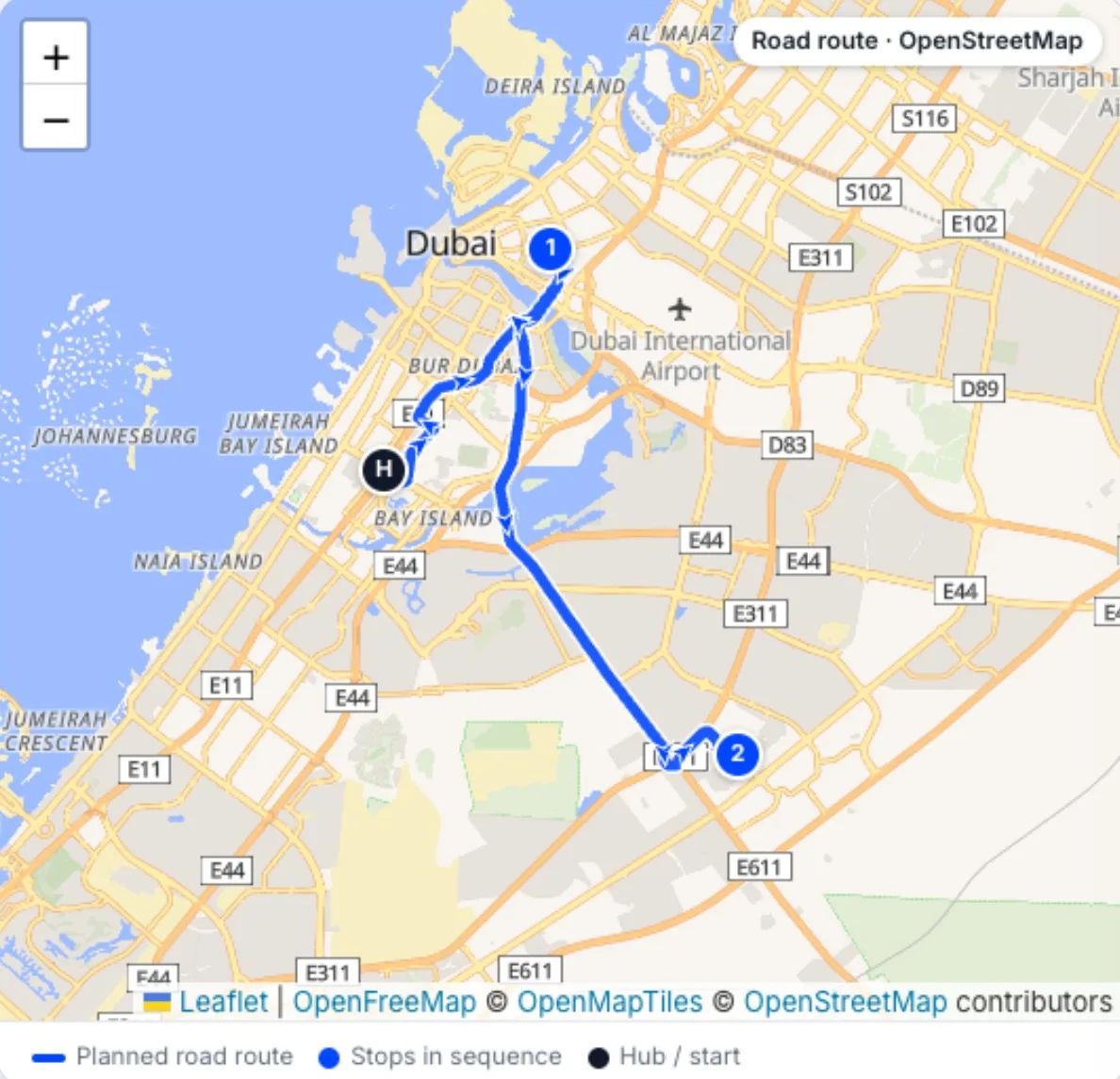
Checked, optimised on real roads, then assigned
- Parcels without a map location or area go to Exceptions
- Fixed on a map: pin the address or pick the area
- An optimised road route on OpenStreetMap, with stop times and distances
- One tap sends the trip to the driver’s app
The real software
The operations console and the field app.
Screens from the live system. Customer names, staff names, phone numbers and vehicle plates are hidden.
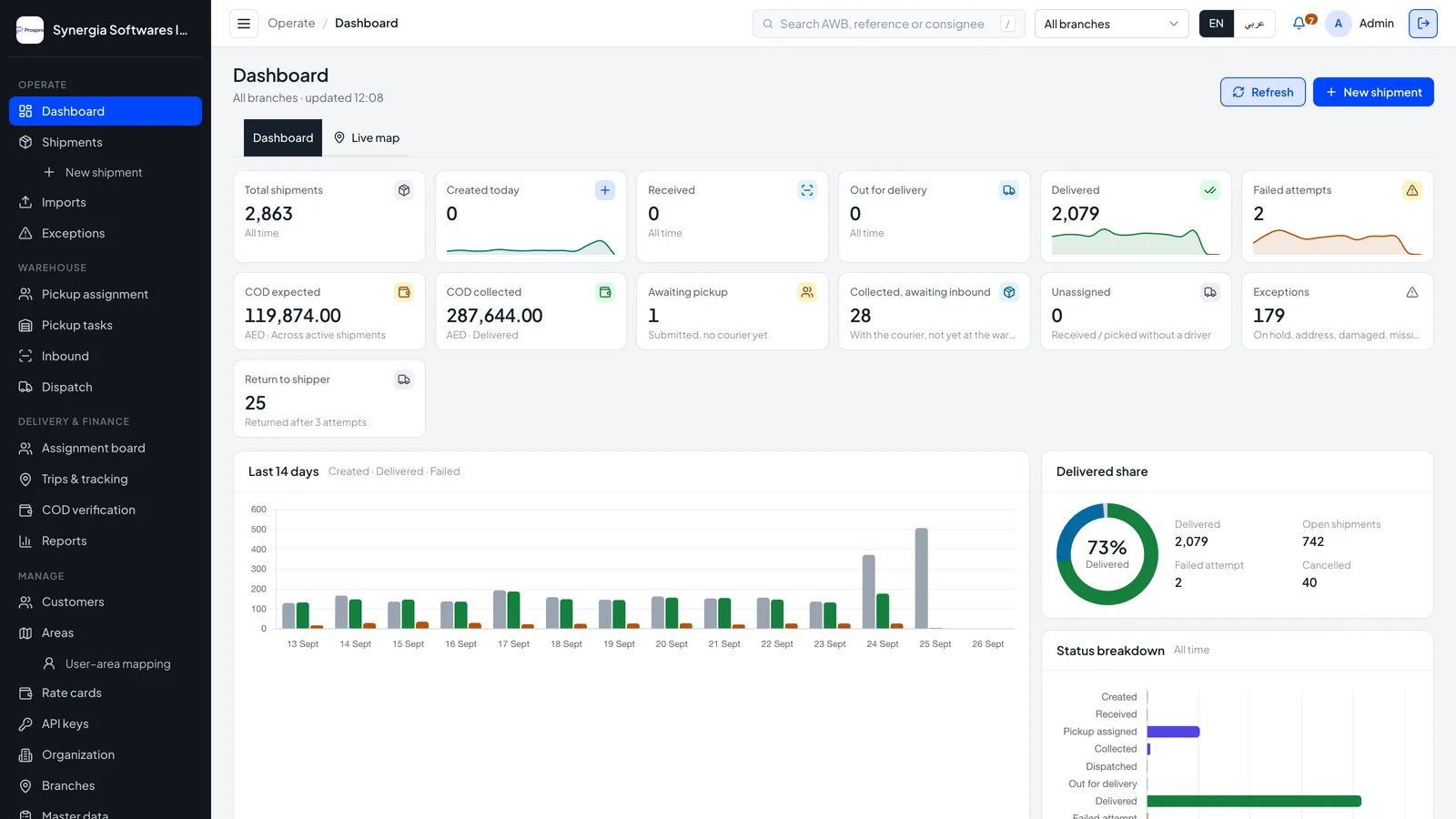
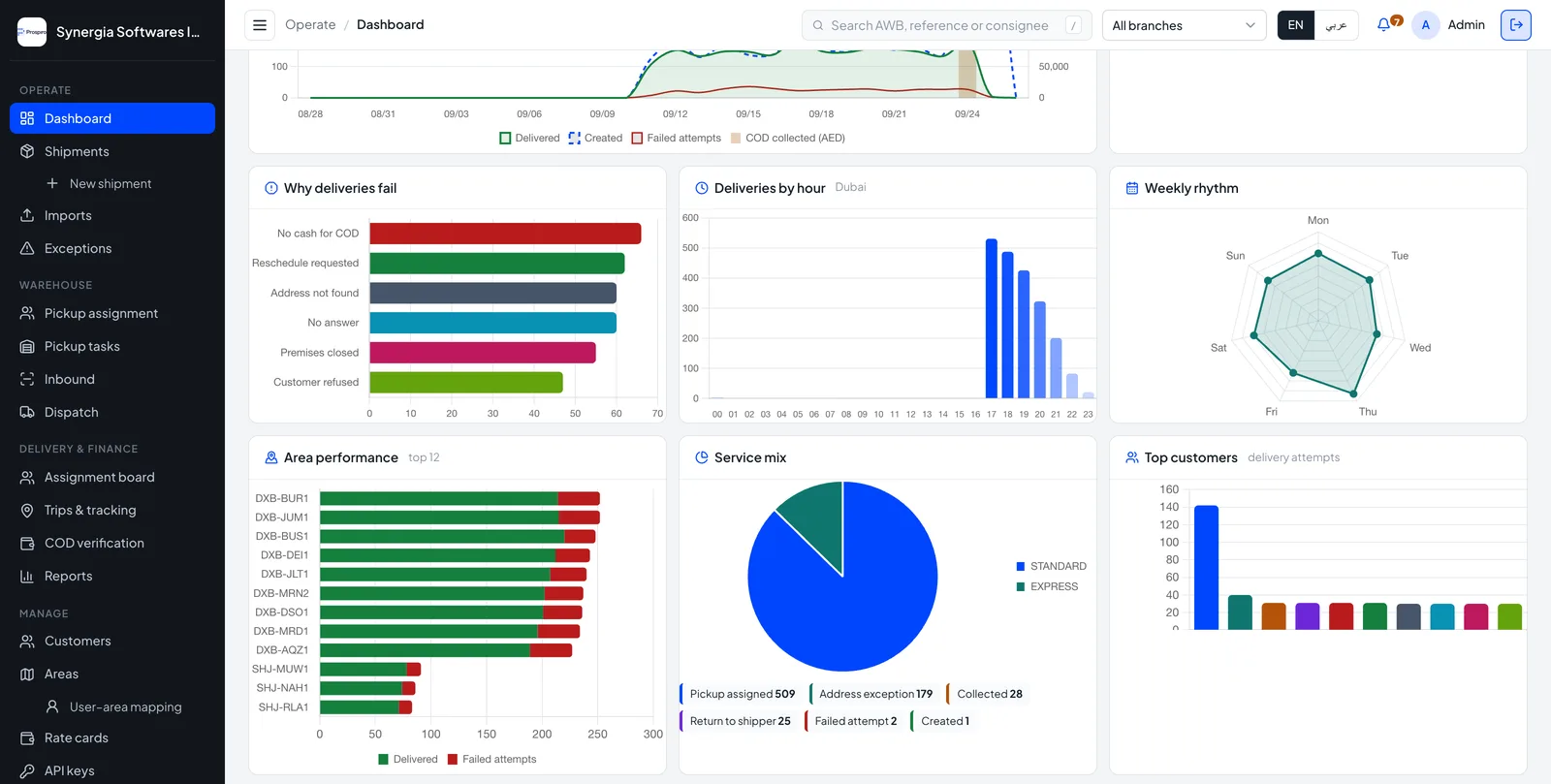
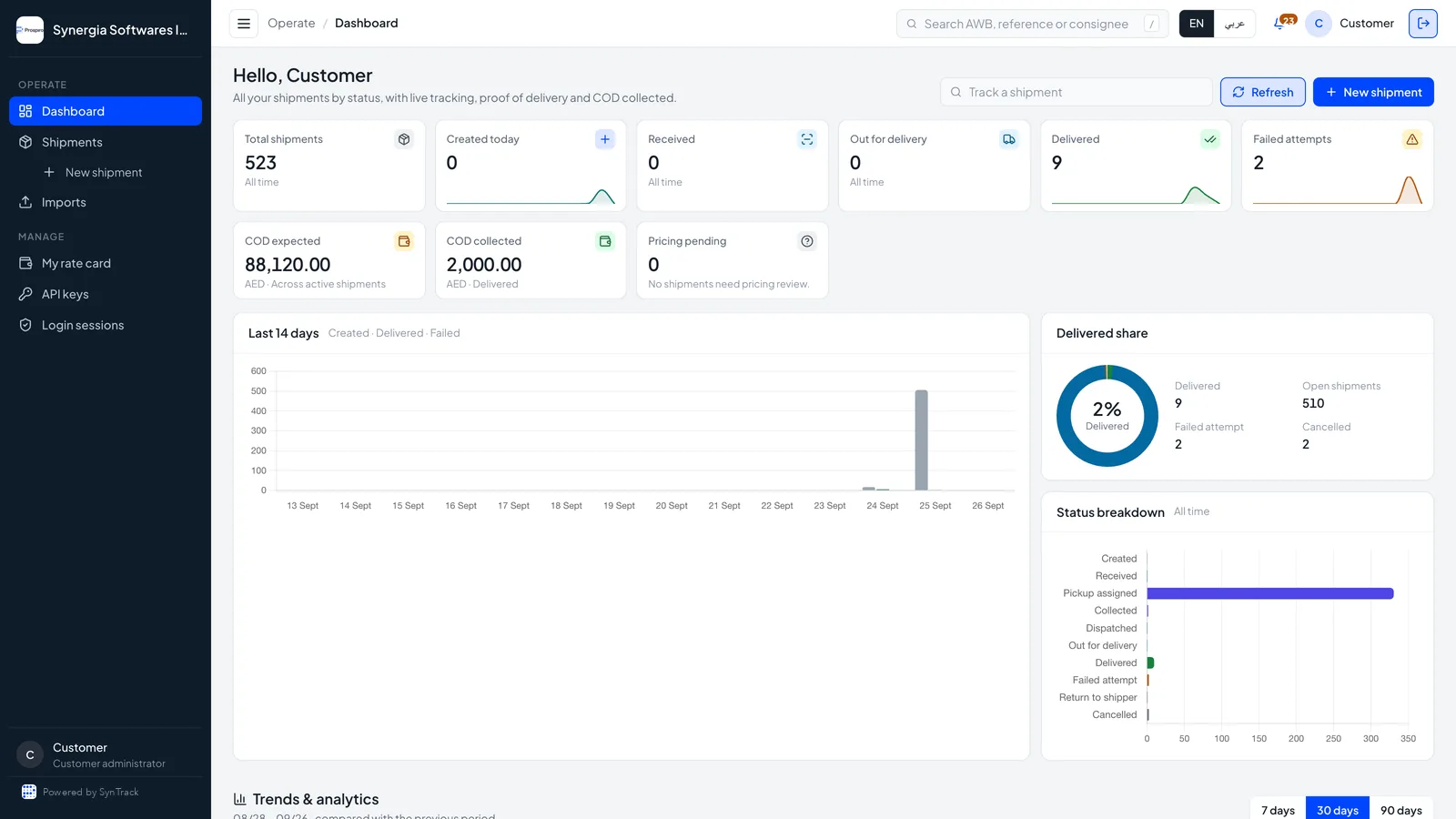
Every branch’s day on one screen: created, received, out for delivery, delivered, exceptions and COD, with the 14-day trend and delivered share.
Real figures from shipment events for 7, 30 or 90 days: failure reasons ranked, deliveries by hour, area performance and service mix.
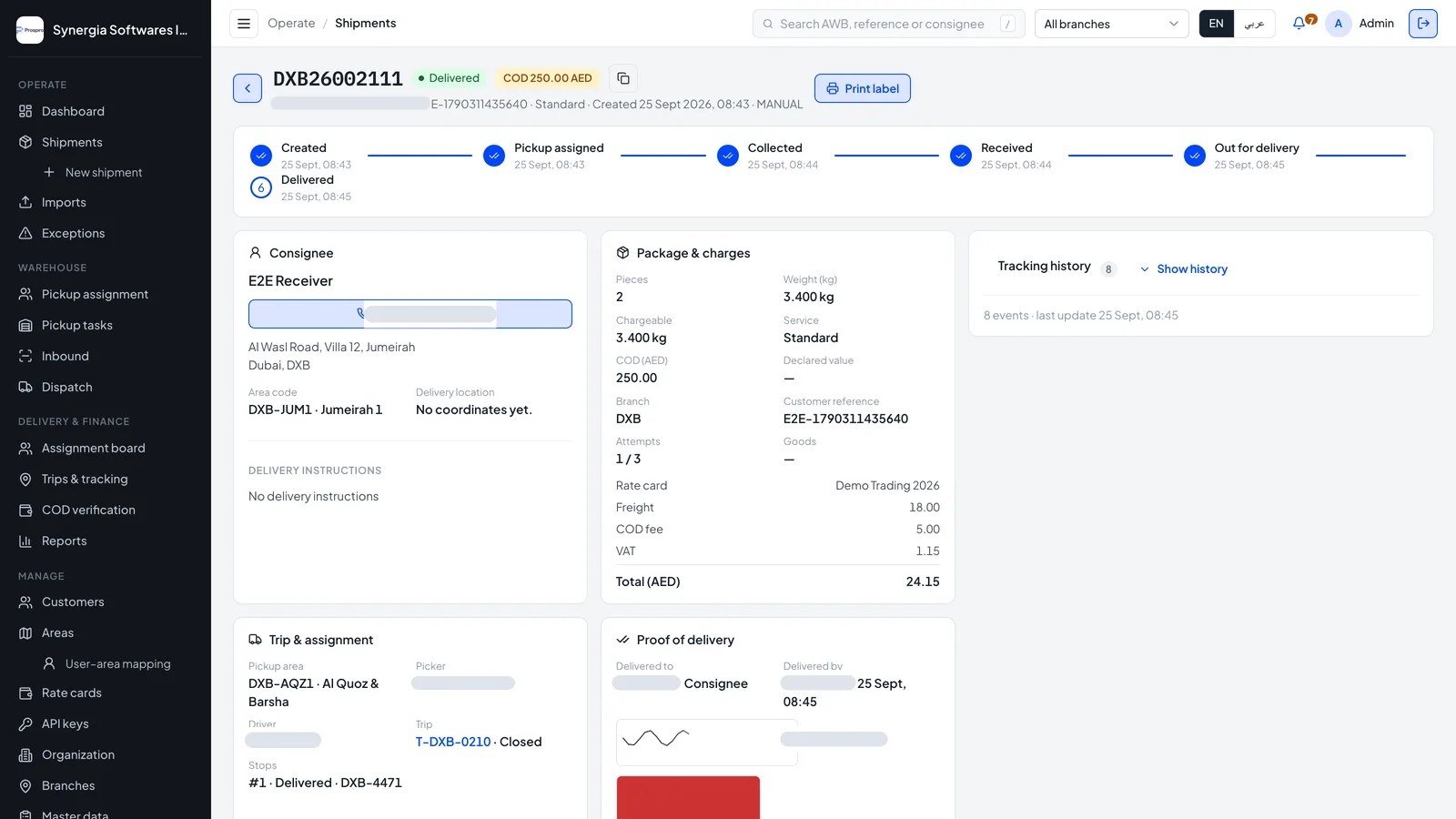
The full record behind one AWB: milestone timeline, consignee, package and charges by rate card, trip, and proof of delivery with signature and photo.
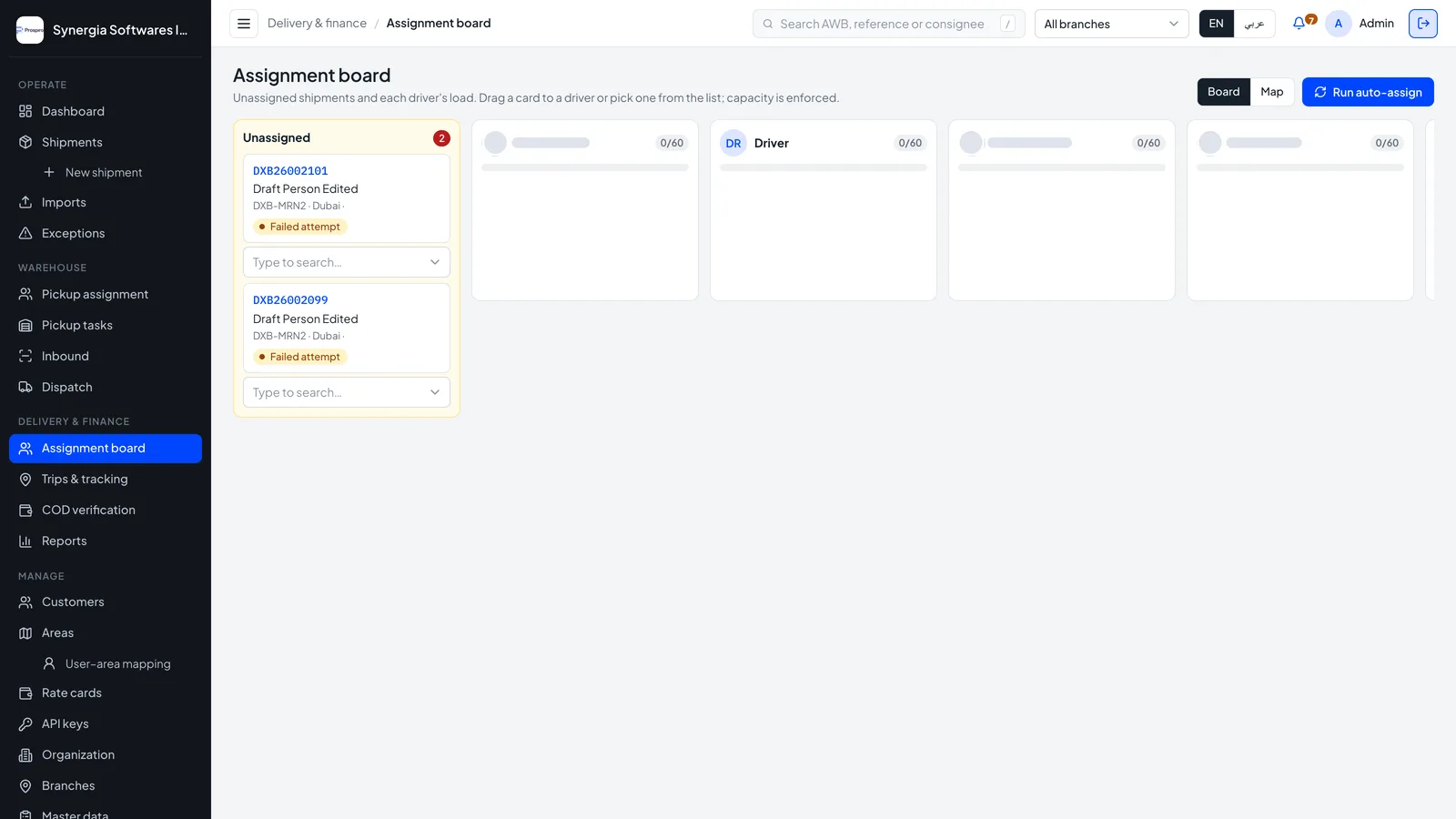
An unassigned column and one lane per driver with current load. Drag to assign, switch to the map, or auto-assign in one click. Failed attempts are flagged.
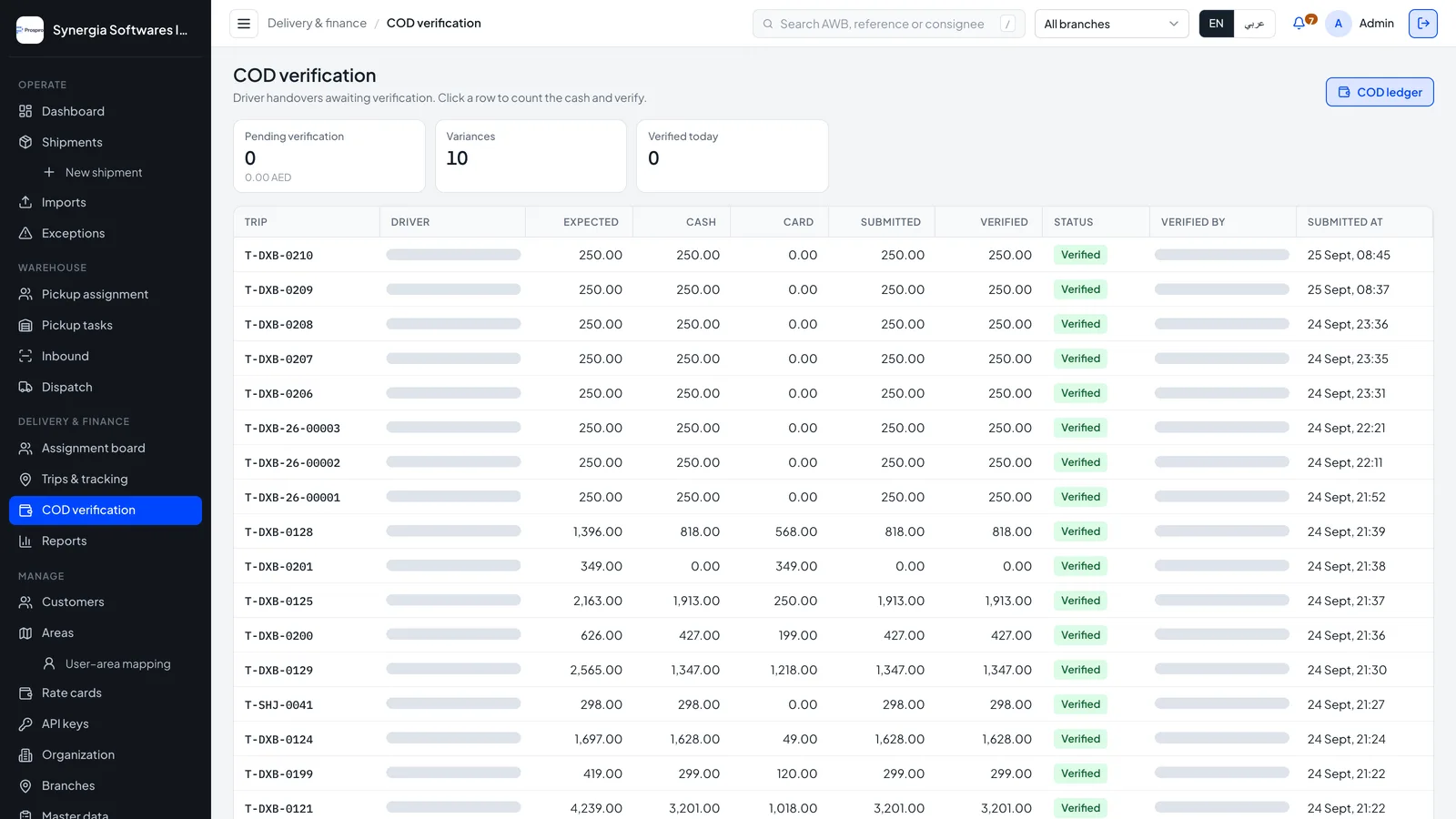
Each trip’s expected cash against cash and card handed in. Supervisors count and verify, variances stand out, and verified cash feeds the COD ledger.
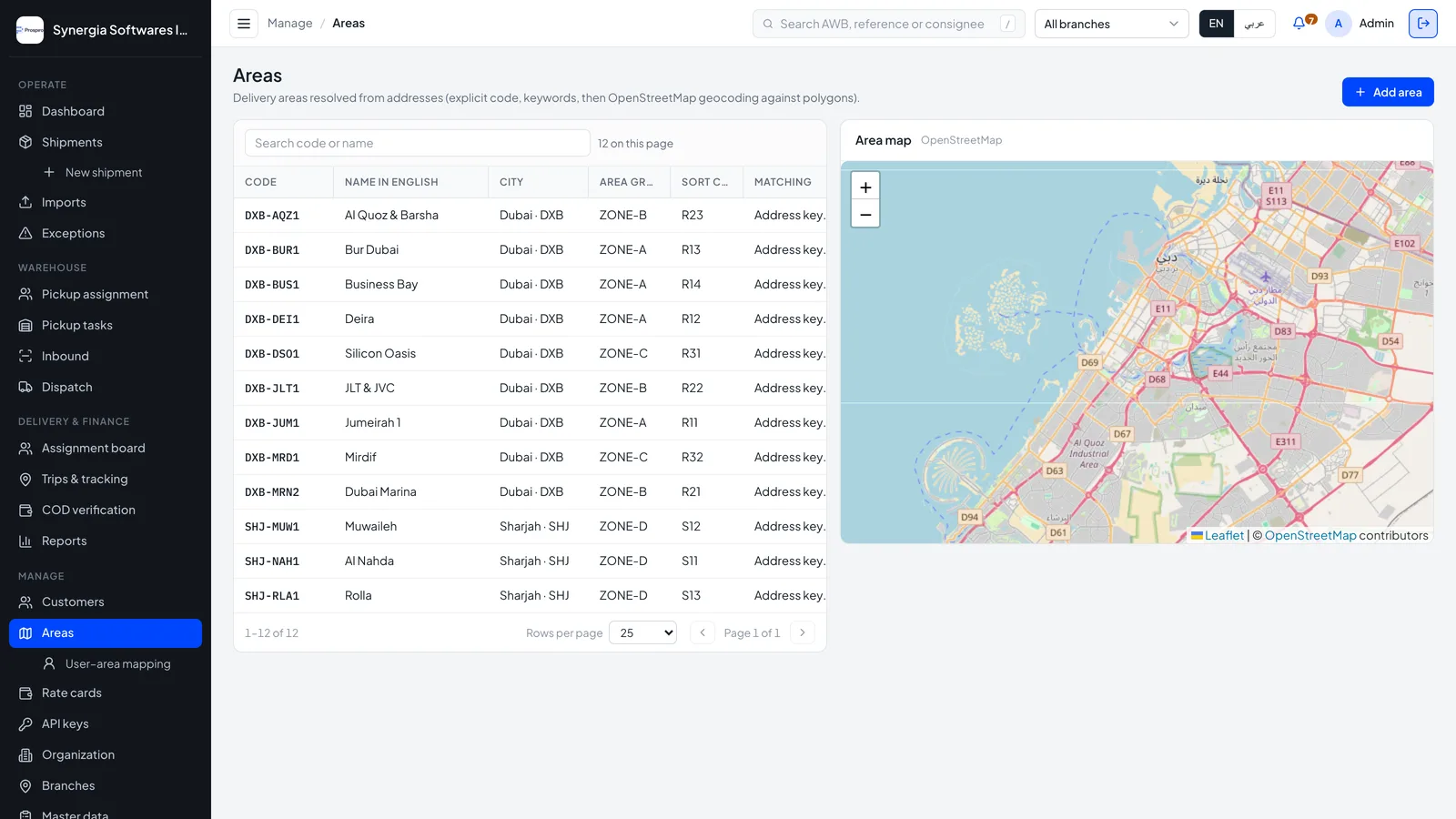
Each area has a code, zone, keywords and a map polygon or radius, so a consignee address lands in the right area on its own.
Each shipper sees only their own parcels: shipments, deliveries, failed attempts and COD collected, plus their rate card, API keys and login sessions.
The Android field app: drivers, supervisors and merchants
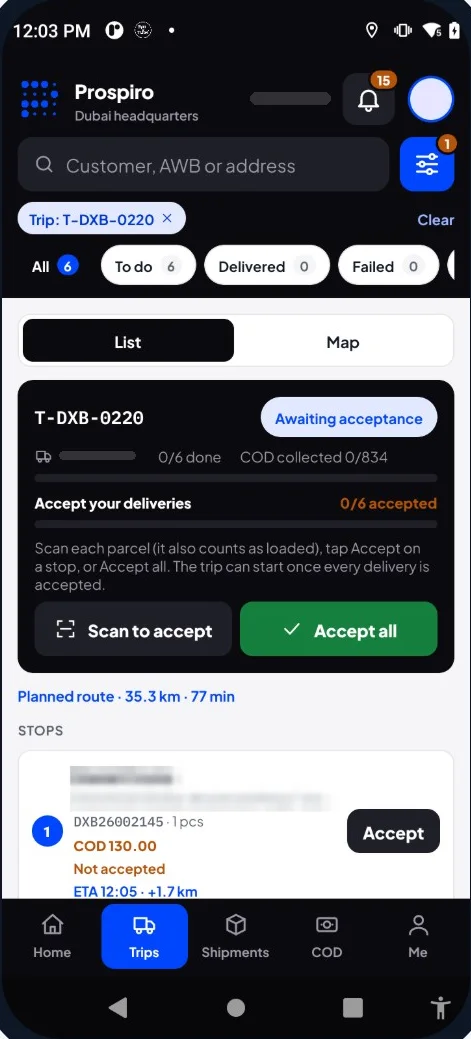
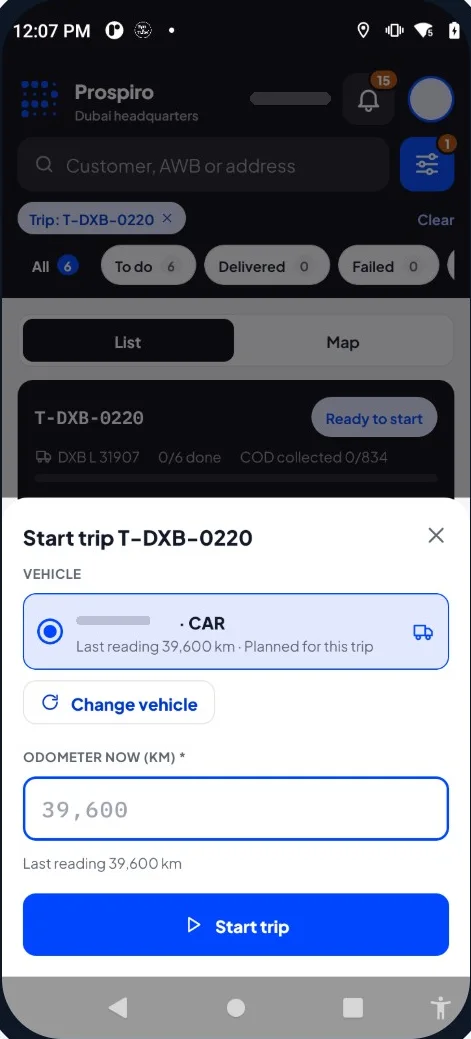
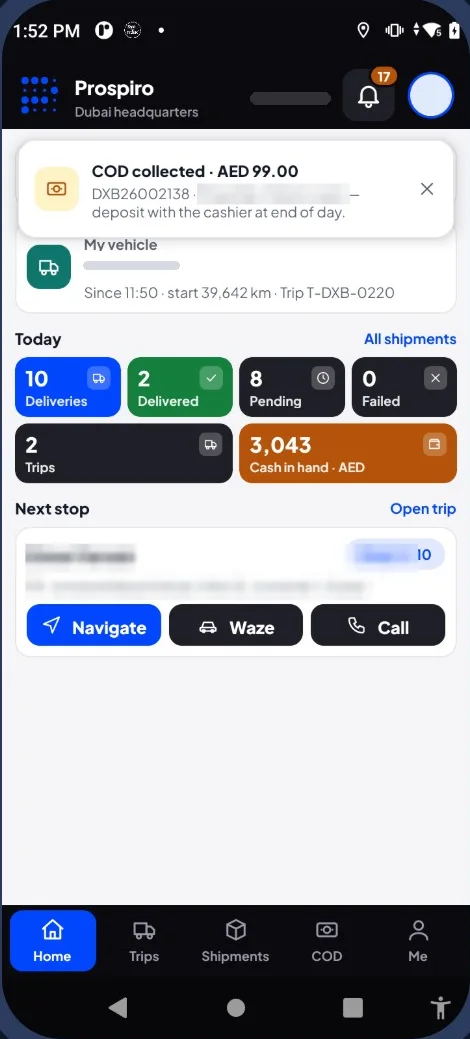
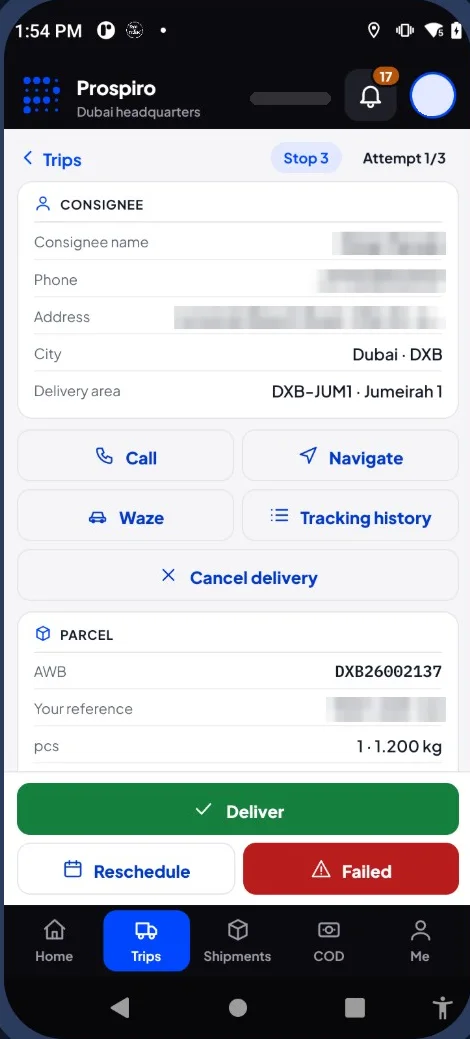
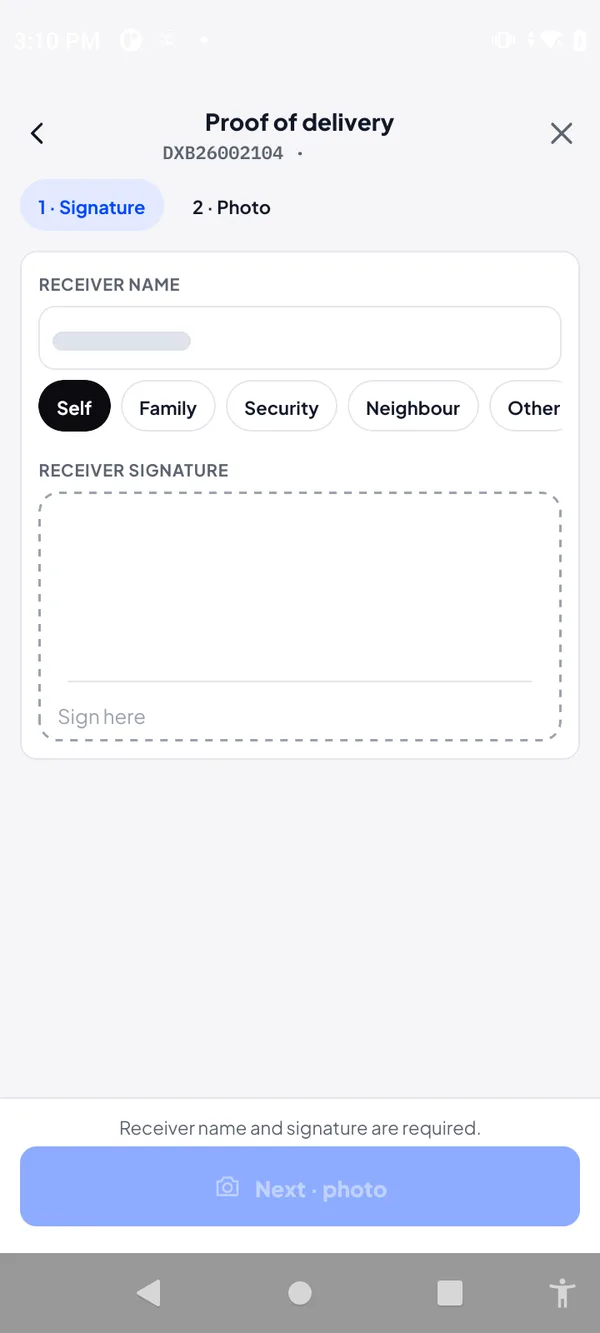
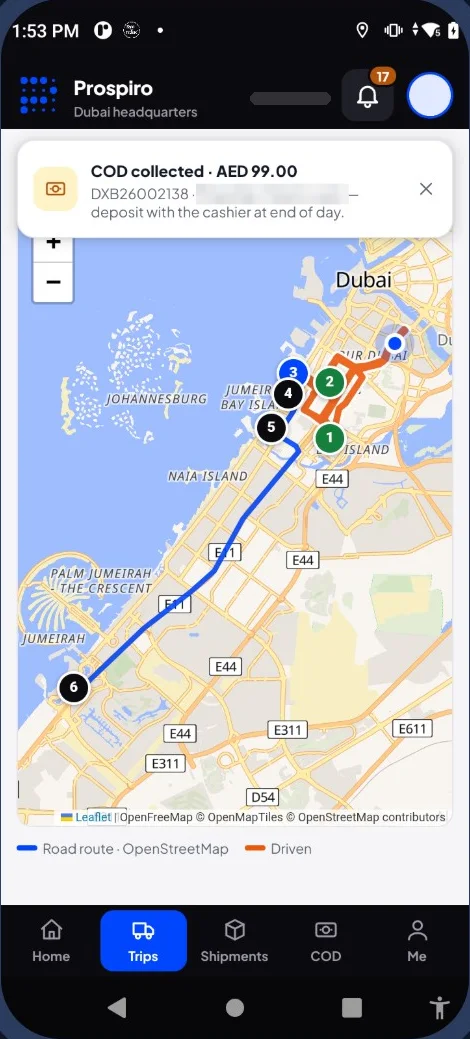
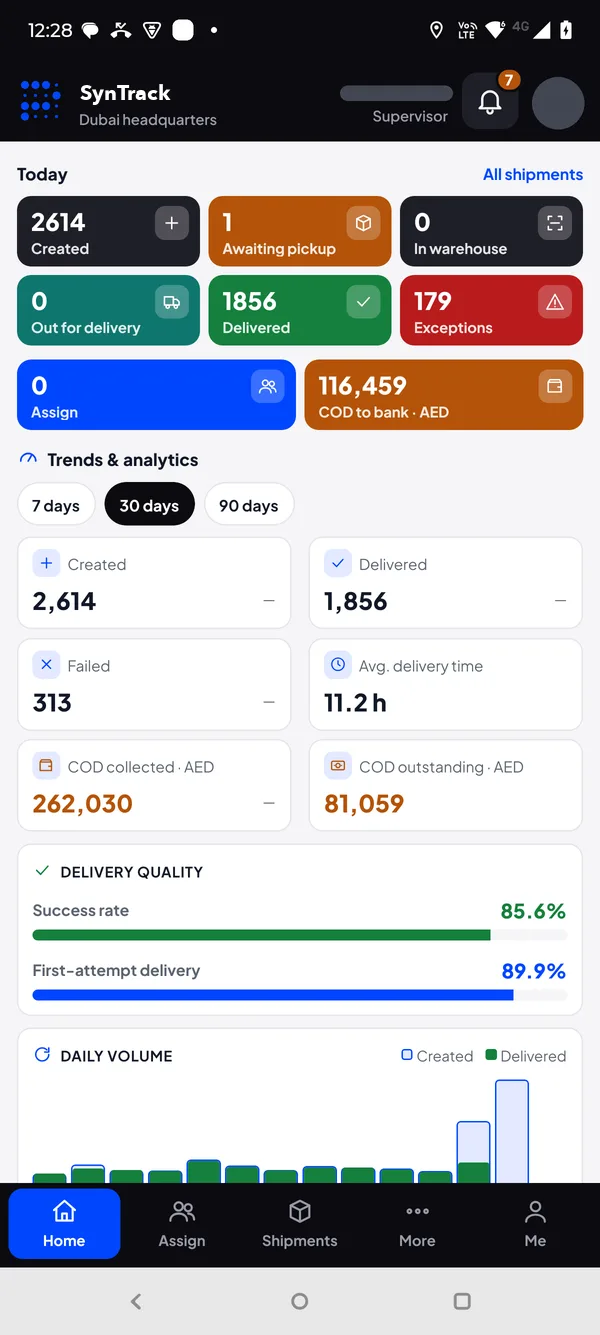
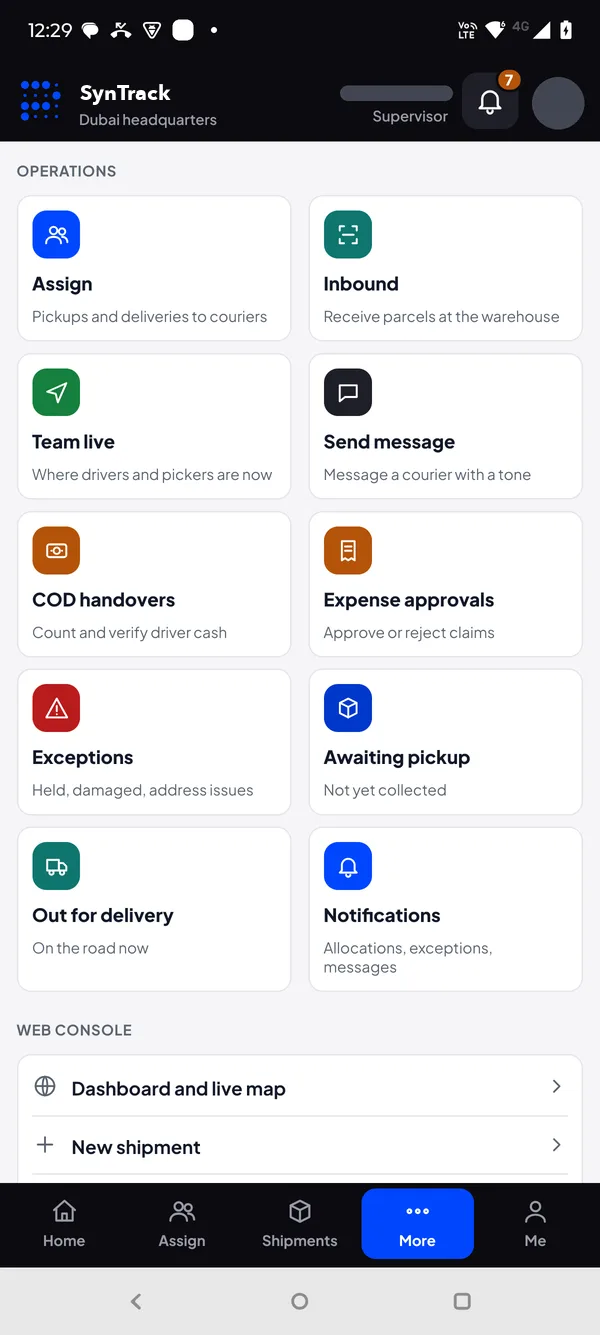
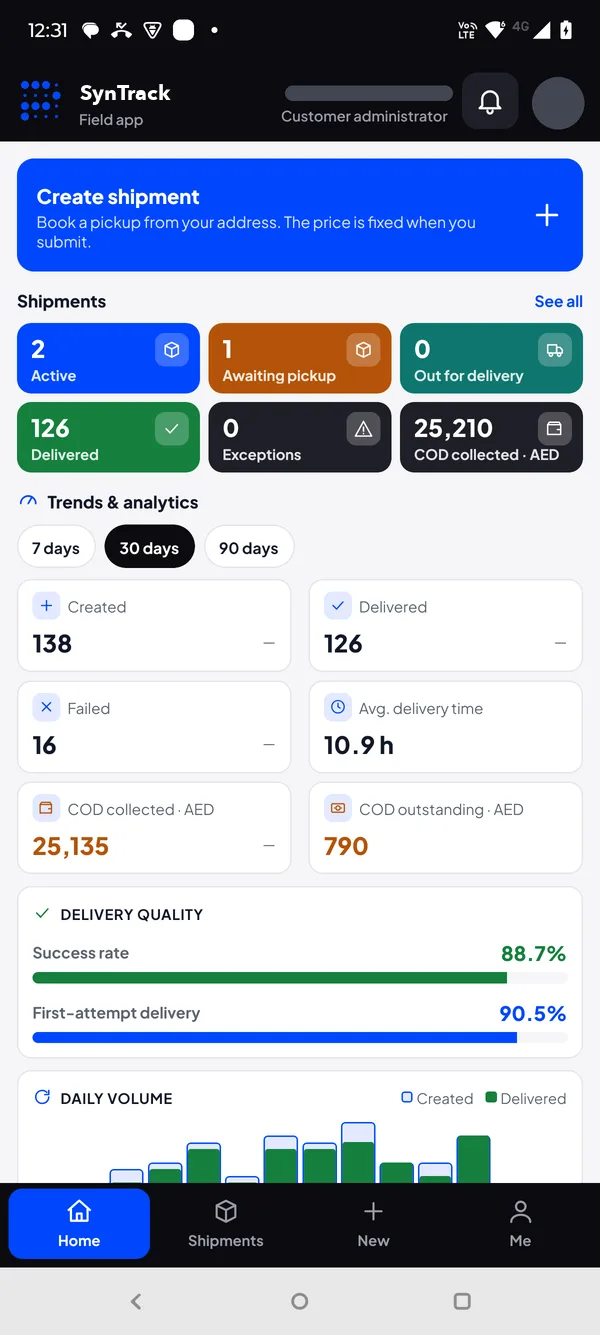
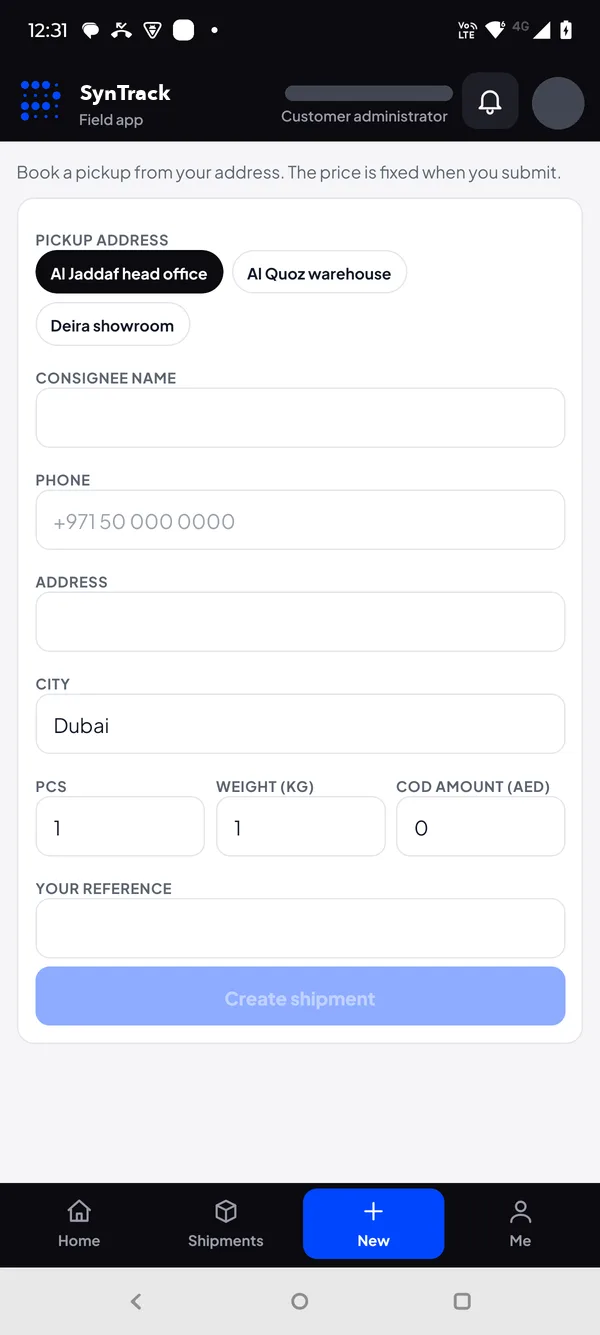
Real screens from the live product. Customer names, staff names and contact details are hidden.
Control tower & tracking
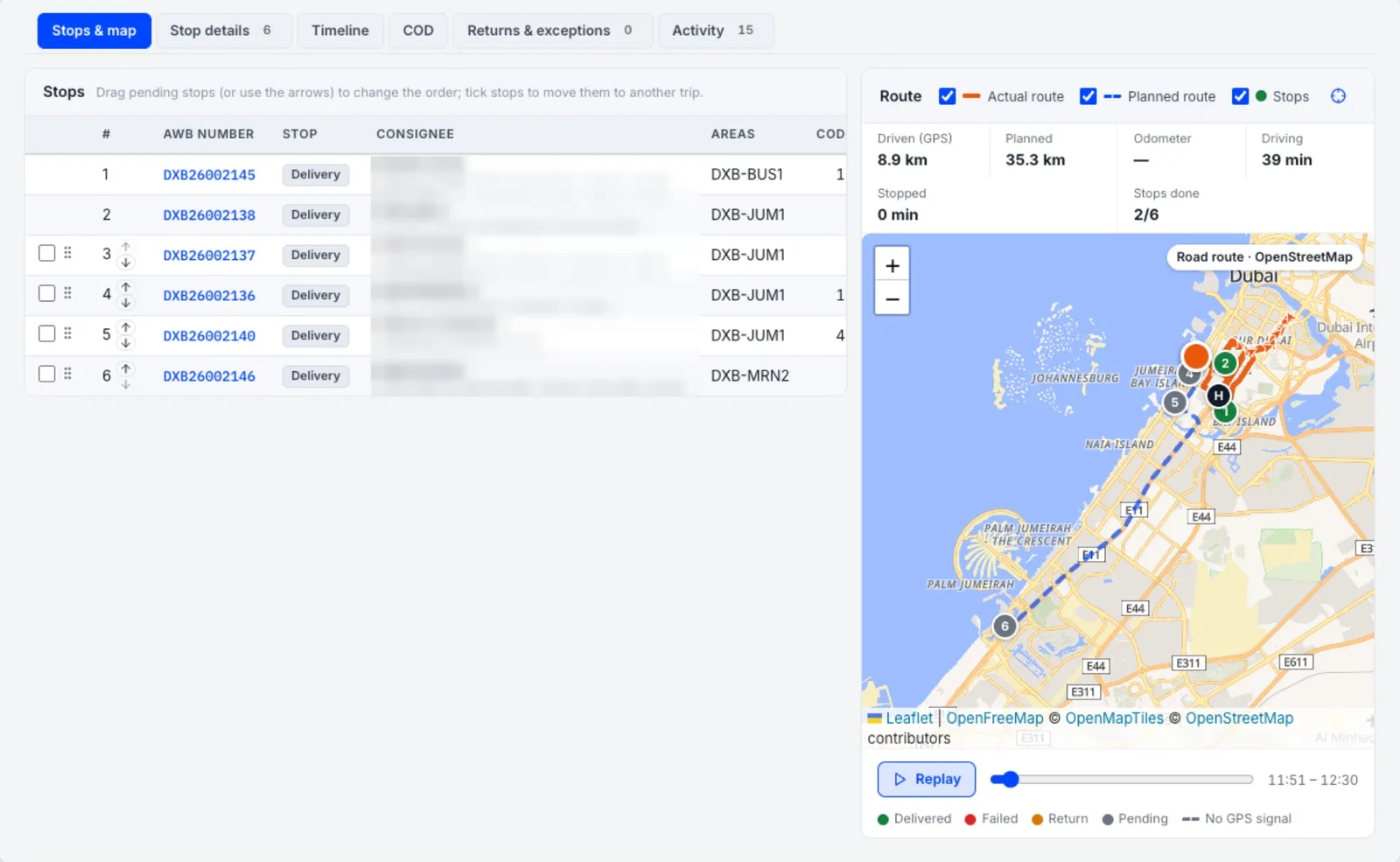
Every trip on the road, live — and the route actually driven.
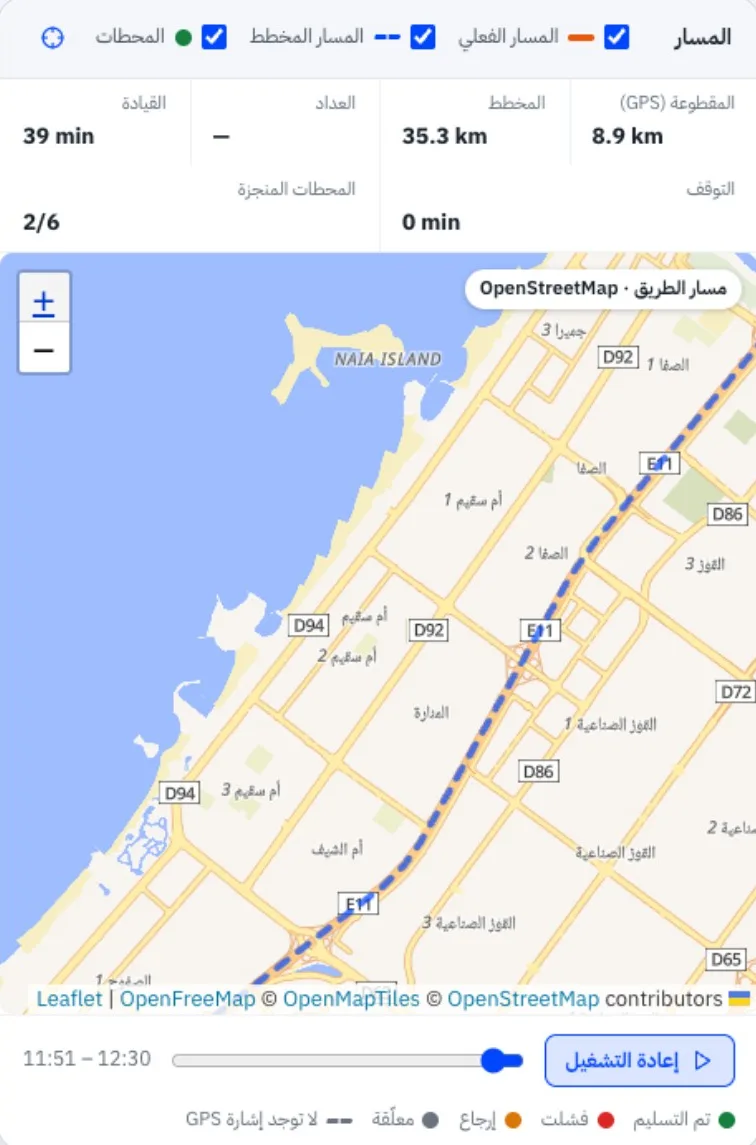
The planned route is dashed and the route actually driven is solid, with distance and time against the plan. Stops are numbered in route order by result — delivered, failed, return and pending — you can replay the day on a timeline, and deliveries made away from the address are flagged.
Driven path and position
The route driven so far and each driver’s current position, refreshed automatically.
Remaining stops
Still to visit, numbered in route order.
Real-time updates
Each scan, delivery and payment shows within seconds, with no reload.
A full dispatch record
Timeline, COD, returns, activity log and exports for every trip.
Control tower alerts
Idle drivers, GPS off, phones offline and restricted areas.
SLA and exceptions
Breached and at-risk queues; on hold, damaged and missing parcels.
Cash on delivery
Every dirham counted and verified.
- 1Collected per stop
Cash, card or transfer, with a reason for any difference.
- 2Driver handover
Submitted from the phone at the end of the trip.
- 3Supervisor verifies
Counted amount entered, variance recorded, trip closed.
- 4Paid to merchants
Remittance cycles, with open invoices offset if you choose.
Finance
Billing that follows the parcels.
Tax invoices
Freight, COD fees, surcharges, return charges and VAT.
Credit notes & statements
Statements with ageing, as professional PDFs.
COD remittances
Preview, approve and pay, with invoice offset.
Reports on schedule
Daily, register, COD, SLA and driver reports, emailed automatically.
The finance dashboard shows COD collected, awaiting handover and due to merchants, and invoices outstanding and overdue.
On the road
Built for the road, with or without signal.
Proof is built in — signature, photo, GPS position and scanner-based checks — and every warning and error is shown plainly, never lost.
Printed at the doorstep
4 × 3 inch thermal labels over Bluetooth to a Zebra ZQ521.
Bilingual
Names, addresses and shipper, shaped right to left.
Preview first
Exactly what the printer will receive, one label per piece.
Any label roll
Gap, black mark or continuous, saved to the printer, with one-tap calibration.
Every format
4 × 3 for Zebra, plus 4 × 6, A6 and A4 PDF on the web.
Works offline
Trips, pickups and parcels stay on the phone; work syncs in order when back online.
Fleet
Every vehicle, driver and kilometre on record.
Default vehicle
Or a free vehicle chosen by the driver at trip start.
Odometer checks
Never below the last reading; big jumps must be confirmed.
Full history
Who, when, which trip, distance and release condition.
Out of service
Blocked from dispatch until it is back in service.
Integrations
Connects to the tools you already use.
Live today
- OpenStreetMap maps, address lookup and road routing
- OpenRouteService route optimisation
- Email (SMTP and IMAP)
- Merchant REST API with keys
- Signed webhooks
- Shopify, WooCommerce and Magento stores
- Backups to Amazon S3 or Google Drive
Available — with your account credentials
- Google Maps
- WhatsApp Business
- SMS gateway and voice / IVR
- Microsoft Entra ID and Google Workspace sign-in
- SAML and OIDC single sign-on
- Payment gateway
- ERP and accounting export
All connectors are managed from one Integrations page, with credentials stored encrypted. Areas and geofences are drawn on the map as polygons or circles, with sort codes.
Capacity & performance
Measured, not promised.
Measured on a single server in load and end-to-end tests, including a full pickup-to-billing run on real operations data. Hardware is sized to your volumes during implementation.
Security
Secure by design.
Role-based access
Permissions per feature and per action, for every role, with your own custom roles.
Zone-level visibility
Staff limited to their own branches and zones.
Device-bound logins
Field accounts tied to one phone; admins can release it.
Session control
See and end sessions; lockout after 5 failed sign-ins.
Full audit trail
Settings, user, role and security changes recorded.
Protected connections
Hashed API keys, signed webhooks and encrypted credentials; the app warns when an update is needed.
Courier mode or delivery mode?
One platform, two modes.
Courier mode — this page
For courier and last-mile companies
Parcels for many merchants: merchant profiles and portal, rate cards, the hub and sort station, merchant invoicing and COD remittances.
Delivery mode
For businesses delivering their own orders
Your own customers and drivers: orders in from your ERP or online store, dispatch, live tracking, proof of delivery and COD.
Prospiro Delivery Management →Implementation
From kickoff to go-live in four steps.
Configure
Branches, areas, rate cards, roles and integrations, set up with you.
Import
Customers, addresses, staff, drivers and vehicles loaded.
Train and pilot
Each role trained, with in-app guides; a pilot on real parcels.
Go live
Hands-on support from Synergia Soft during and after launch.
Who it is for
Wherever a parcel and a promise travel together.
E-commerce couriers
High parcel volumes from online stores, COD-heavy, where first-attempt success is margin.
Express couriers
Same-day and next-day promises that need live visibility and SLA queues.
Document couriers
Every piece scanned and every handover proven with name, signature, photo and GPS.
Fragile & high-value
Weight and damage checks at the hub, and proof of delivery that ends disputes.
3PL last mile
Delivering for many merchants, each with their own rate card, invoices and COD remittance.
Multi-branch networks
Branches and zones with staff limited to the areas they are responsible for.
Not sure which fits?
Courier moves parcels. These are its neighbours.
Delivery Management (delivery mode)
The same Prospiro platform for businesses delivering their own orders.
Explore →Part of the Prospiro family
Prospiro products, one family.
This product is part of the Prospiro family, alongside Prospiro ERP, which connects sales, stock, purchasing, finance, e-commerce, POS and field teams in one system.
Questions
Courier management software — FAQs.
What is courier management software?
Courier management software runs a courier or last-mile company end to end: merchant bookings, pickups, hub receiving and sorting, dispatch, delivery with proof, cash on delivery and billing. Prospiro Courier Pro does this in one system, on the web and on Android, for courier companies in the UAE and the GCC.
What is the difference between courier mode and delivery mode?
Prospiro is one last-mile platform with two modes. Courier mode is for courier and last-mile companies delivering parcels for many merchants, with rate cards, merchant invoicing and COD remittances. Delivery mode is for businesses delivering their own orders with their own drivers — see Prospiro Delivery Management.
How do merchants send shipments?
Four ways: booking in the merchant portal (pickup address, date and slot, service type and COD amount), Excel import with a template, a full preview and an error file, orders arriving automatically from Shopify, WooCommerce and Magento stores, or the REST API with keys and signed webhooks.
How are pickups assigned?
Each pickup goes automatically to the courier responsible for its area. Supervisors can review pickups grouped by picker, area or customer and reassign them, an optimised pickup route with arrival times is available when switched on, and the picker scans every piece and can print the label at the customer.
What happens at the hub?
Every piece is scanned in, with optional weight and dimensions, and weight differences or damage are raised on the spot. The sort station shows the sort code and drops each parcel into its bag, each sealed bag gets a manifest, and one scan loads the whole bag onto the vehicle.
How are trips planned and dispatched?
The dispatch board shows every driver with their vehicle, capacity and load, and proposes hub parcels from each driver’s own delivery areas, each to one driver only. The supervisor decides what goes. The route plan sends parcels without a map location or area to Exceptions, optimises the trip on real roads with stop times and distances, and one tap sends it to the driver’s app.
Does the driver app work without signal?
Yes. Trips, pickups and parcels stay on the phone and work syncs in order when the phone is back online. When it is online, supervisors see each scan and delivery within seconds.
What proof of delivery is captured?
The receiver’s name, a signature, a photo and the GPS position of the handover. The tracking view also flags deliveries made away from the address.
How is cash on delivery controlled?
COD is collected per stop by cash, card or transfer, with a reason for any difference. The driver submits the handover from the phone at the end of the trip, the supervisor enters the counted amount and the variance is recorded before the trip closes. Merchants are paid in remittance cycles, with open invoices offset if you choose.
Can drivers print labels on the road?
Yes. 4 × 3 inch thermal labels print over Bluetooth to a Zebra ZQ521, bilingual and shaped right to left for Arabic, with a preview of exactly what the printer receives. The web console also produces 4 × 6, A6 and A4 PDF labels.
Is the system available in Arabic?
Yes. Every screen, message, report and label is available in English and Arabic, right to left, and each user picks their language. Maps follow the user’s language too.
Which integrations are included?
Live today: OpenStreetMap maps, address lookup and road routing, OpenRouteService route optimisation, email, the merchant REST API with keys, signed webhooks, Shopify, WooCommerce and Magento stores, and backups to Amazon S3 or Google Drive. Available with your own account credentials: Google Maps, WhatsApp Business, an SMS gateway and voice/IVR, Microsoft Entra ID and Google Workspace sign-in, SAML and OIDC single sign-on, a payment gateway and ERP or accounting export.
How much volume can it handle?
In load and end-to-end tests on a single server, 2,000 shipments were created in 23.8 seconds with zero failures, booking was sustained at 84 per second with 10 clients at once, the 95th-percentile time to create a shipment was 262 ms, and a status change reached every open screen in under 7 seconds. Hardware is sized to your volumes during implementation.
How long does implementation take?
Four steps: configure branches, areas, rate cards, roles and integrations with you; import customers, addresses, staff, drivers and vehicles; train each role and run a pilot on real parcels; then go live with hands-on support from Synergia Soft during and after launch.
In Saudi Arabia
Runs in the Kingdom the way it runs in the UAE.
For Saudi courier and last-mile companies, Prospiro Courier Pro runs the merchant portal, the hub, the offline driver app and COD in English and Arabic, right to left.
- ع/EArabic and English screens and documents, with bilingual invoices in SAR.
- ZATCASynergia Soft is listed in ZATCA’s Solution Providers Directory for Phase 1 (e-invoice generation). Phase 2 is scoped to your business profile and confirmed in writing.
- KSASaudi clients include Barik International, ARS, Pro Serve and Hadeel.
Get started
Run tomorrow's parcels on Prospiro.
A 30-minute walkthrough on your real operation: book, pick up, sort, dispatch, deliver, verify the COD and invoice — and watch the money trail stay unbroken.
Prefer WhatsApp? Message us directly