Prospiro Delivery Management · Delivery mode
Delivery management software for businesses that deliver their own orders.
Prospiro takes every order from wherever it starts — your ERP, your online store, a spreadsheet or an API — and gets it to the customer’s door: dispatched, tracked live, confirmed with proof of delivery and paid. Web dashboard, Android driver app and customer app, customised to the way you deliver.
Orders in
Orders arrive from wherever they start.
No re-typing between systems. Prospiro connects to SynTrack ERP out of the box and exposes APIs for everything else.
Manual entry
Dispatchers and branch staff key in orders as they come in by phone or at the counter.
Excel import
Upload a day’s orders in one file, with a full preview and an error file for anything that needs fixing.
SynTrack ERP
Sales orders and invoices from SynTrack ERP flow straight into delivery.
Online stores
Shopify, WooCommerce and Magento orders arrive automatically, ready to dispatch.
REST API & webhooks
Your POS, ERP or any other system pushes orders in with API keys and receives status changes through signed webhooks.
What it does
From dispatch to doorstep — and the proof that it got there.
Dispatch board
Every open order in one place, assigned to drivers by the dispatcher in a few clicks.
Proposed by area
The system proposes orders to drivers from their own delivery areas and shows why; the dispatcher decides.
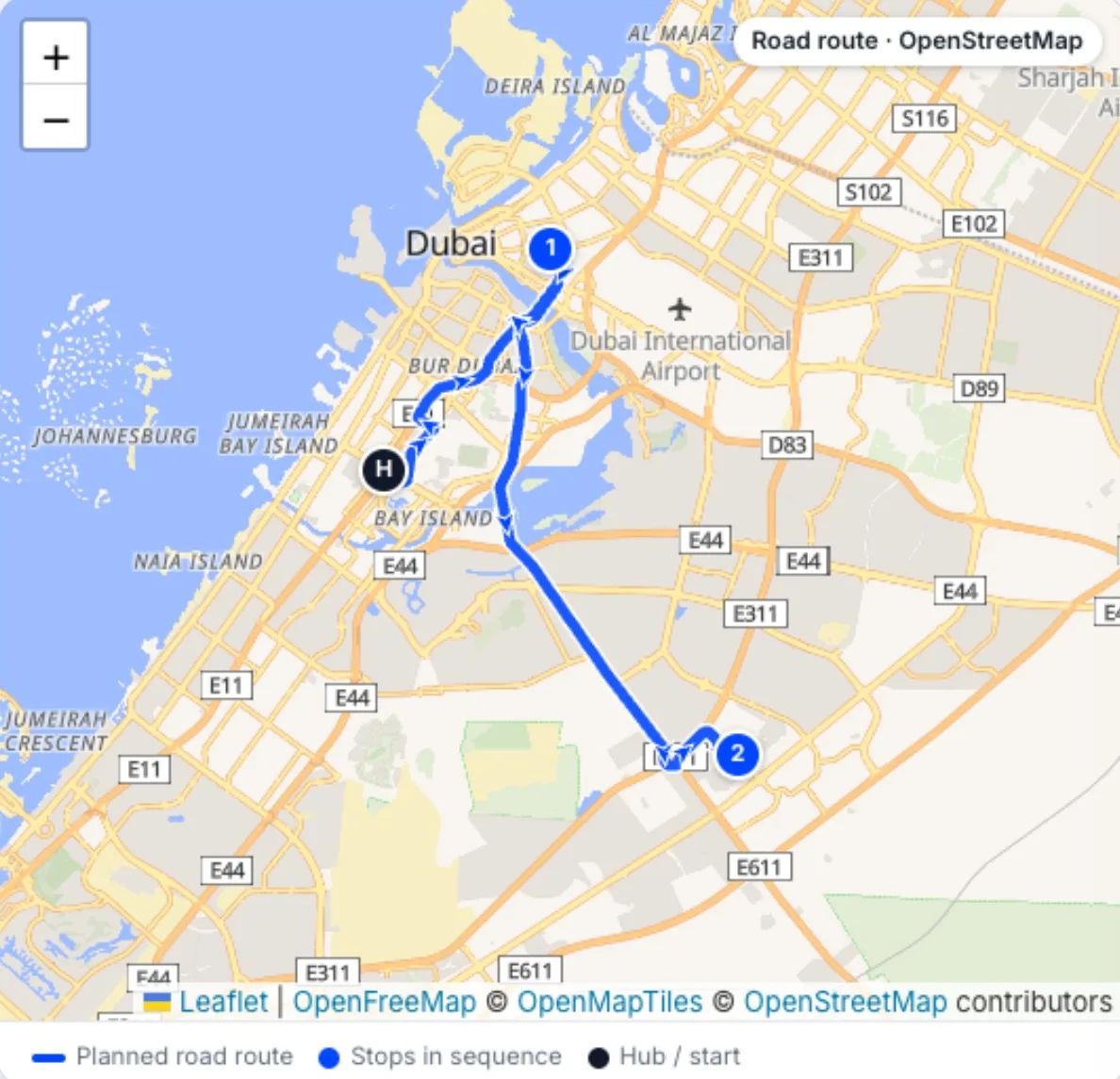
Road-optimised routes
Each run optimised on real roads, with stop times and distances, before the van leaves.
Live control tower
Every driver’s position and driven path, remaining stops and alerts for idle drivers or GPS off.
Offline driver app
The day’s drops, navigation and proof in the driver’s hand — working with or without signal.
Proof of delivery
Receiver name, signature, photo and the GPS position of the handover.
Cash on delivery
COD collected against each order in the app and reported for reconciliation.
SMS & WhatsApp updates
Customers told when their order is on the way, through your own SMS gateway and WhatsApp Business account.
Public tracking page
A tracking page that refreshes itself, so fewer “where is my order?” calls.
Customer app
Your customers follow their orders and deliveries from their own app.
English & Arabic
Every screen, message, report and label in both languages, right to left in Arabic.
Customisable
Configured and extended to your process, fields, rules and integrations.
The real app
What your drivers actually use.
Screens from the live Android driver app. Customer names, staff names, phone numbers and vehicle plates are hidden.
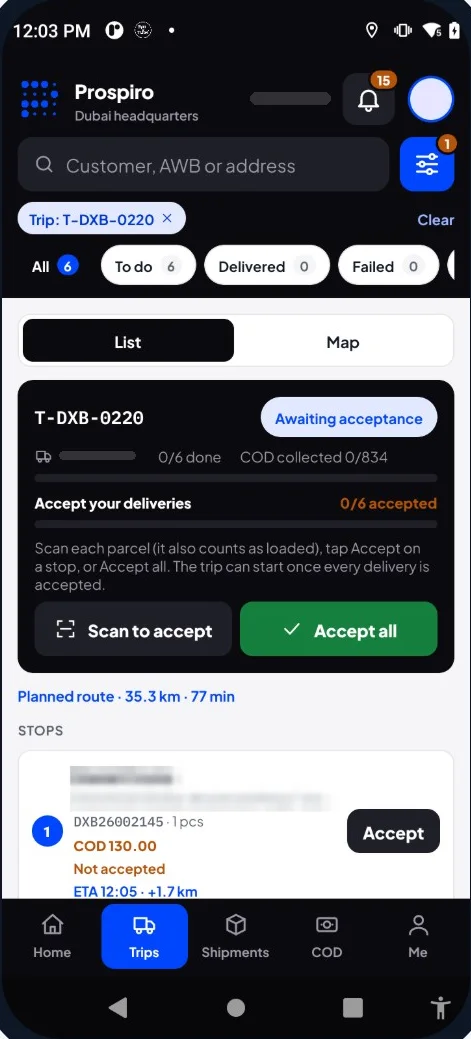
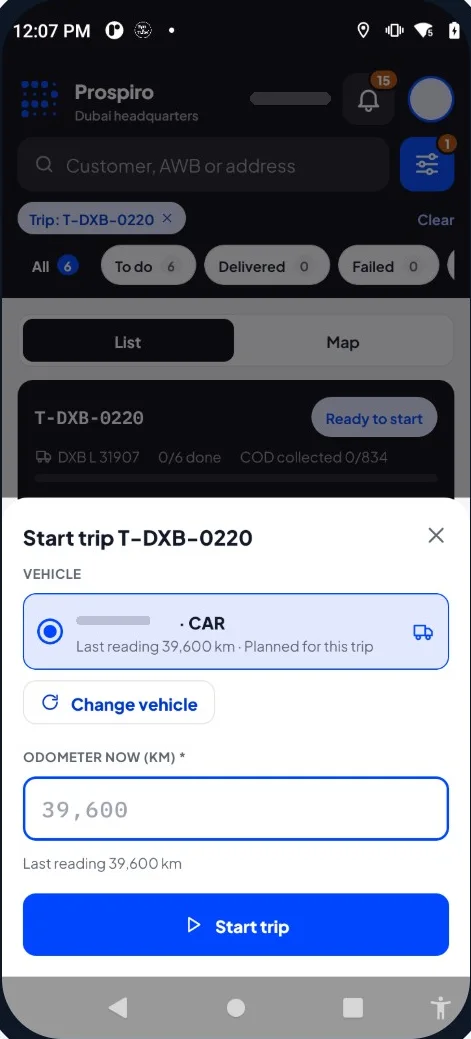
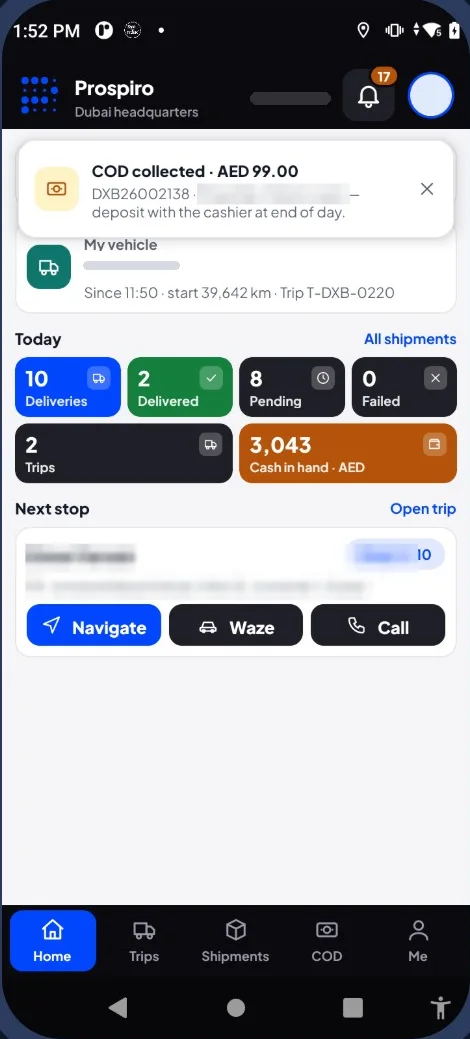
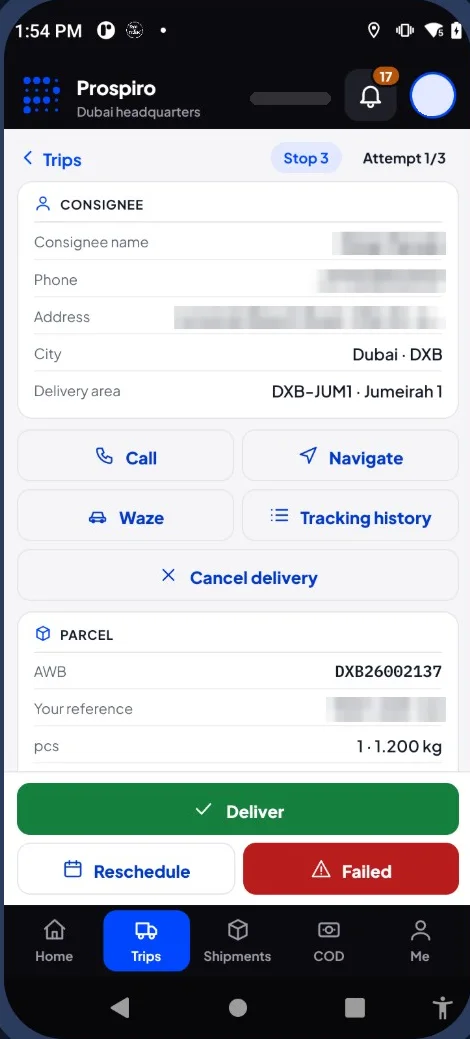
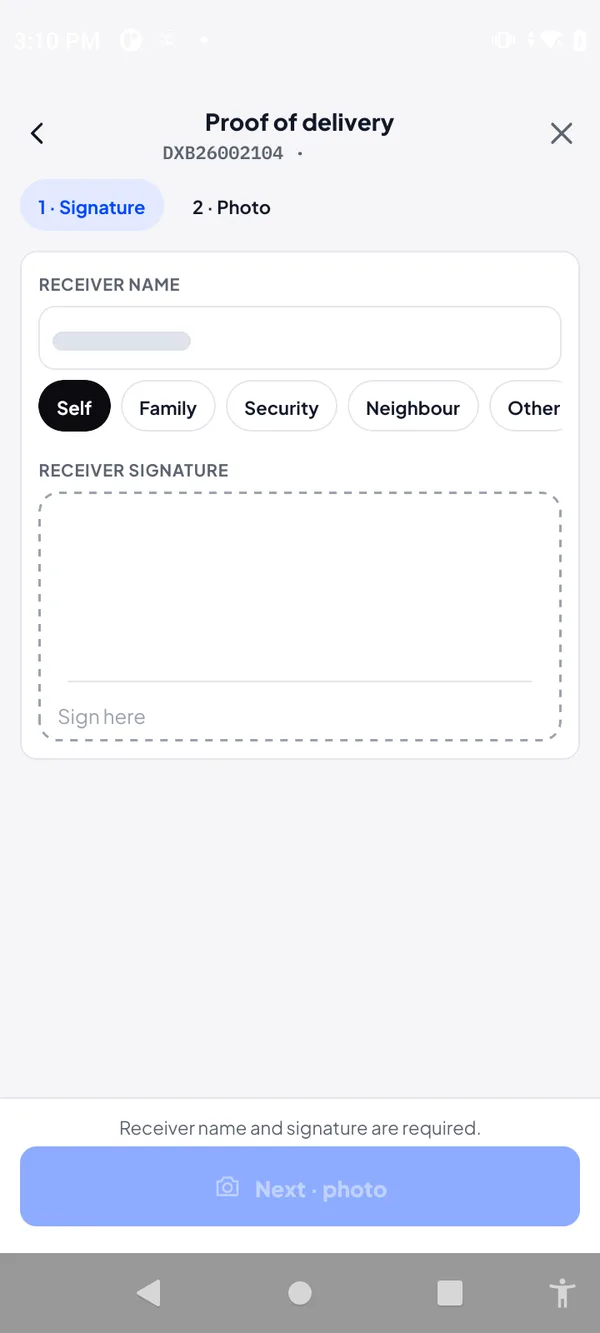
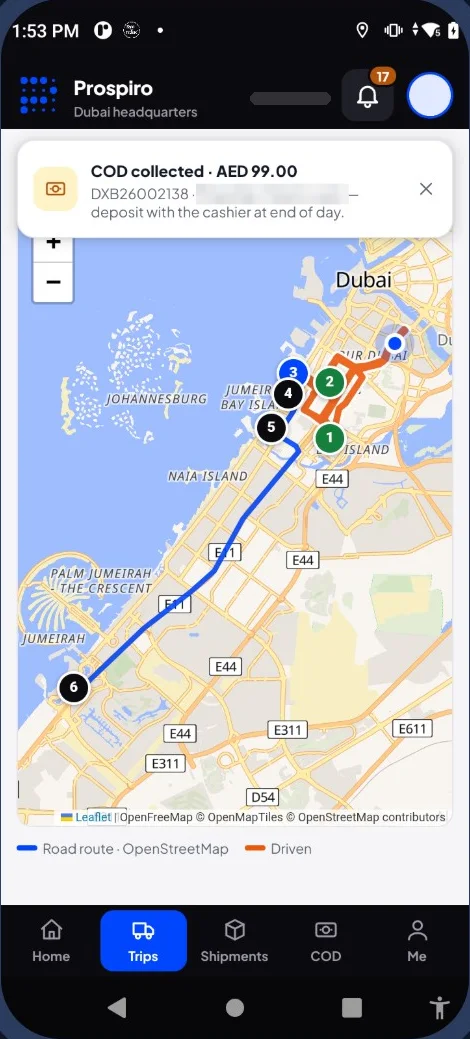
Real screens from the live product. Customer names, staff names and contact details are hidden.
Control tower & tracking
Every delivery on the road, live — and the route actually driven.
Each scan, delivery and payment reaches the dispatcher within seconds, with no reload. After the trip, compare the planned route with the one actually driven and replay the day.
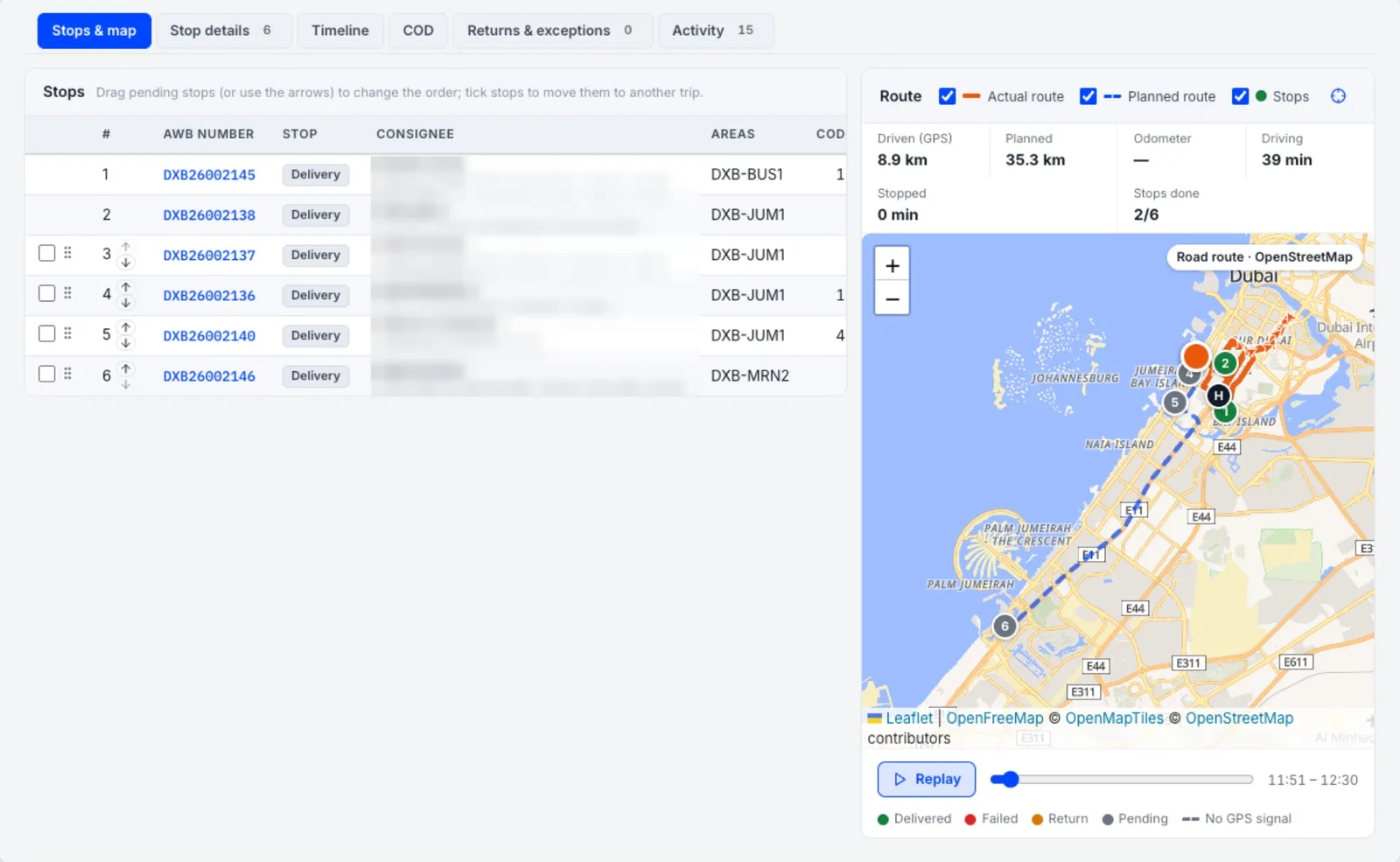
Driven path and position
Each driver’s current position and the route driven so far, refreshed automatically.
Remaining stops
Still to visit, numbered in route order.
Alerts
Idle drivers, GPS switched off, phones offline and restricted areas.
Planned vs actual
Planned route dashed, the route actually driven solid, with distance and time against the plan.
Replay the day
Move through the trip on a timeline, with stops by result: delivered, failed, return and pending.
Where it happened
Deliveries made away from the customer’s address are flagged.
Prospiro Delivery Management is the delivery mode of the same platform that runs Prospiro Courier Pro — measured on a single server at 2,000 orders created in 23.8 seconds, with a status change reaching every open screen in under 7 seconds.
The workflow
Order in, delivered, reported.
The platform
Three apps, one delivery operation.
Web dashboard
For dispatchers, supervisors and managers: orders, dispatch, route planning, live tracking, COD and reports.
Android driver app
For drivers: the day’s drops, navigation, proof of delivery with name, signature, photo and GPS, and COD collection.
Customer app
For your customers: follow orders and deliveries, alongside the public tracking page and — where your accounts are connected — SMS and WhatsApp updates.
Proof of delivery
Three ways to prove it got there.
Disputes about deliveries are expensive. Prospiro captures proof at the door and attaches it to the order, so the answer to “was it delivered?” is always on record.
Signature
The receiver signs on the driver’s screen. Simple and familiar for business-to-business drops where a named person accepts the goods.
Photo
A photo of the delivered goods at the door or at the receiving bay — useful when the customer is not there in person or when condition matters.
GPS position
The location of every handover is recorded with the proof, and deliveries made away from the customer’s address are flagged.
A delivery day
One day on Prospiro, from first order to last report.
An illustrative day for a business delivering its own orders.
- Before dispatch
Orders arrive
Overnight and morning orders come in from SynTrack ERP, the online store, Excel or the APIs — no re-keying.
- Morning
Routes planned and assigned
The dispatcher plans routes and assigns orders, manually or automatically, and each driver sees the day’s drops in the app.
- On the road
Customers informed
Customers follow their order on the tracking page — and by SMS or WhatsApp where your accounts are connected; the dispatcher follows every driver in the control tower.
- At the door
Delivered with proof
The driver captures the receiver’s name, signature, photo and GPS position, and collects cash where the order is COD.
- During the day
Exceptions handled
The dispatcher sees which orders are still open and reassigns work between drivers from the dashboard.
- End of day
Cash verified and reported
Drivers hand over COD from the phone, a supervisor verifies the count, and deliveries, drivers and COD are reported.
Who it is for
Any business that delivers with its own drivers.
Distributors & Wholesalers
Deliveries to shops, branches and trade customers, with COD and proof of delivery on every drop.
Retail & E-commerce
Shopify, WooCommerce and Magento orders delivered by your own drivers, with customers following a live tracking page.
Restaurants & Food
Time-sensitive orders dispatched fast and tracked to the door.
Pharmacies
Medicine deliveries with the receiver’s name, signature, photo and GPS position on record for every hand-over.
Water & Gas Delivery
Recurring routes and doorstep cash collection, planned and tracked every day.
Your operation
Any business with its own drivers — configured to the way you deliver.
How a rollout runs
From requirements to go-live.
Requirements
We map how you take orders, dispatch and deliver today, and agree what Prospiro needs to do — including any customisation.
Configure & connect
Your order flow, proof-of-delivery rules and reports are set up, and SynTrack ERP, your online store or other systems are connected.
Train drivers & dispatch
Dispatchers learn the dashboard and drivers learn the Android app, on your real orders.
Go live, then refine
Deliveries run on Prospiro; reports and rules are tuned as your team uses it.
Choosing delivery management software
What to check before you choose — in the UAE or anywhere.
Whichever system you pick, these are the questions that decide whether it works for a business delivering its own orders.
- Orders flow in from your ERP and online store, not retyped
- Manual and automatic assignment, plus route planning
- Live driver tracking, with planned versus actual routes
- Proof of delivery with signature, photo and GPS position
- Cash on delivery collected and reported per driver
- A public tracking page — and WhatsApp or SMS through your own accounts
- Store connectors and an open API for the systems you already use
- An offline driver app, in English and Arabic
- Customisation to your process — scoped in writing
Which one fits?
Delivery management, courier or DSD?
Three kinds of delivery software, built for three different businesses.
Related
The rest of the delivery picture.
Part of the Prospiro family
Prospiro products, one family.
This product is part of the Prospiro family, alongside Prospiro ERP, which connects sales, stock, purchasing, finance, e-commerce, POS and field teams in one system.
Questions
Delivery management software — FAQs.
What is delivery management software?
Delivery management software runs the deliveries a business makes to its own customers: orders come in, they are dispatched to drivers, drivers are tracked live, customers are kept informed, and every drop ends with proof of delivery and, where needed, cash collected. Prospiro Delivery Management does this on a web dashboard, an Android driver app and a customer app.
How is it different from courier software?
Prospiro is one last-mile platform with two modes. Courier mode — Prospiro Courier Pro — is for courier and last-mile companies delivering parcels for many merchants and billing them per shipment. Delivery mode — Prospiro Delivery Management — is for businesses that deliver their own orders with their own drivers: distributors, retailers and e-commerce stores, restaurants, pharmacies, water and gas suppliers.
How do orders get into the system?
Orders can be entered manually, imported from Excel with a full preview and an error file, pulled from SynTrack ERP, received automatically from Shopify, WooCommerce and Magento stores, or pushed in by any other system through the REST API with keys and signed webhooks.
Can it plan routes and assign drivers automatically?
Yes. Dispatchers can assign orders manually or let the system propose them by area. The route plan sends orders without a map location to Exceptions to be fixed on the map, optimises the trip on real roads with stop times and distances, and one tap sends it to the driver’s app.
What proof of delivery does the driver capture?
The receiver’s name, a signature, a photo and the GPS position of the handover, captured in the Android driver app and attached to the order. Deliveries made away from the address are flagged.
Does it handle cash on delivery?
Yes. COD amounts are carried on each order, collected by the driver in the app, and reported so cash can be reconciled.
How are customers kept informed?
Every customer gets a public tracking page that refreshes itself, and can follow deliveries in the customer app. SMS and WhatsApp notifications connect through your own SMS gateway and WhatsApp Business account.
Which devices do drivers need?
An Android phone. The driver app works offline — trips and orders stay on the phone and sync in order when back online — and prints labels over Bluetooth to a Zebra ZQ521. Dispatchers and managers use the web console in a browser, and your customers use the customer app.
Is it available in Arabic?
Yes. Every screen, message, report and label is available in English and Arabic, right to left, and each user picks their language. Maps follow the user’s language too.
Can managers see every driver live?
Yes. The control tower shows each driver’s current position and the route driven so far, with remaining stops numbered in route order, and alerts for idle drivers, GPS switched off and phones offline. After the trip, the planned route can be compared with the route actually driven and the day replayed on a timeline.
How does cash on delivery get reconciled?
Each order carries its COD amount, collected at the door by cash, card or transfer with a reason for any difference. The driver submits the handover from the phone at the end of the trip, and a supervisor enters the counted amount so the variance is recorded before the trip closes. COD is also reported per driver and per order so finance can match what was collected against what was handed in.
How long does it take to go live?
It depends on how much is customised and which systems are connected. We scope it with you during discovery and agree a written rollout plan — requirements, configuration, integrations, driver training and go-live — before work starts.
Can it be customised to our process?
Yes. Prospiro Delivery Management is configured and extended to your requirements — your order flow, your proof-of-delivery rules, your reports and your integrations — scoped with you before implementation.
In Saudi Arabia
Runs in the Kingdom the way it runs in the UAE.
For Saudi businesses delivering their own orders, Prospiro runs dispatch, live tracking, the offline driver app and COD in English and Arabic, right to left.
- ع/EArabic and English screens and documents, with bilingual invoices in SAR.
- ZATCASynergia Soft is listed in ZATCA’s Solution Providers Directory for Phase 1 (e-invoice generation). Phase 2 is scoped to your business profile and confirmed in writing.
- KSASaudi clients include Barik International, ARS, Pro Serve and Hadeel.
Get started
See your deliveries run on Prospiro.
A 30-minute demo shaped around your operation: orders in, dispatch, live tracking, proof of delivery and COD — and what we would customise for you.
Prefer WhatsApp? Message us directly